Keyword clustering is one of the most effective ways to turn a messy list of search queries into a clear, actionable structure for SEO. Instead of working with thousands of individual keywords, you group them by meaning and intent, which makes it much easier to plan categories, content, and site architecture.
Table of Contents
- What You’ll Need (Setup)
- Dataset: Preparing Keywords
- Clean Keywords (Handle Intent Noise)
- Generate Embeddings
- Cluster Keywords (K-means)
- Analyze Clusters
- Improve Results
- Auto-Label Clusters with AI
- Build Final Dataset
- Limitations & Real-World Notes
In this guide, I will walk through a practical, end-to-end approach to clustering keywords using Python and AI. To keep things simple and reproducible, I will use a generated beauty dataset focused on makeup and perfumery as an example. The same method works with real data from tools like Google Search Console.

Although the focus here is SEO, this approach is just as useful for on-site search analysis. If you collect search queries from your website, you can cluster them in the same way to better understand user behavior, identify demand patterns, and improve navigation or product discovery.
1. What You’ll Need (Setup)
Before we start clustering, you only need a few basic things set up. Nothing complex, but it helps to have everything ready so you can follow along smoothly.
1. Python
You’ll need Python installed on your computer.
If you don’t have it yet, download it from the official website and install it.
To check if it’s installed, you need to open the terminal:
- Windows:
PressWin + R, typecmd, and press Enter.
Or open the Start menu and search for “Command Prompt”. - Mac:
PressCmd + Space, type “Terminal”, and open it.
Once the terminal is open, run:
python --versionIf you see a version number, Python is installed correctly.
2. Required Libraries
We’ll use a few Python libraries. Install them with:
pip install pandas numpy scikit-learn openai tqdm3. OpenAI API Key
To generate embeddings, you’ll need an API key from OpenAI.
- Go to the API Keys on OpenAI platform
- Create an API key (button: create new secret key)
- Copy it and keep it safe
4. Basic Command Line Usage
You don’t need advanced knowledge, just a few basics:
- Navigate to a folder:
cd path_to_your_folder- Run a Python script:
python script_name.py5. Project Folder
Create a simple folder for this project, for example, “keyword-clustering”. Inside it, we’ll keep datasets (CSV files), Python scripts, and final outputs.
2. Dataset: Preparing Keywords
Before we can cluster anything, we need a dataset of keywords. In a real project, this usually comes from tools like Google Search Console, Ahrefs, or internal search data. For this guide, we’ll use a generated beauty dataset so you can easily reproduce every step.
Our dataset is a simple CSV file with three columns:
| keyword | clicks | impressions |
|---|---|---|
| best foundation for oily skin | 45 | 1200 |
| lipstick matte red | 30 | 900 |
| perfume for women floral | 60 | 1500 |
3. Clean Keywords (Handle Intent Noise)
At this stage, the goal is to make clustering focus on product meaning, not search intent.
Real keywords often include words like:
- buy
- best
- price
- review
If we use these as-is, clustering tends to group keywords by intent instead of product type.
We don’t remove these keywords from the dataset. Instead, we create a cleaned version of each keyword that ignores intent words during clustering. We’ll call this column “keyword_clean”.
| keyword | keyword_clean |
|---|---|
| buy foundation | foundation |
| best foundation for oily skin | foundation for oily skin |
Create clean_keywords.py
- Enable file extensions in Windows:
- In Windows Explorer → View → enable File name extensions
- In your project folder:
- Right-click → New → Text Document
- Name the file:
clean_keywords.pyMake sure it does not end with .txt
- Open the file in an editor. I use Notepad++
- Paste the script and save. Make sure you replace the dataset name in the script with your file name.
import pandas as pd
import re

# load dataset
df = pd.read_csv("<strong><mark style="background-color:rgba(0, 0, 0, 0)" class="has-inline-color has-luminous-vivid-amber-color">beauty_keywords_10k.csv</mark></strong>")

def clean_keyword(kw):
    kw = kw.lower()

    # words to ignore during clustering
    kw = re.sub(r'\b(buy|best|price|review|cheap|sale|online|shop)\b', '', kw)

    # clean extra spaces
    kw = re.sub(r'\s+', ' ', kw).strip()

    return kw

# create new column
df["keyword_clean"] = df["keyword"].apply(clean_keyword)

# save result
df.to_csv("keywords_cleaned.csv", index=False)

print("Done! Created keywords_cleaned.csv")Now your Python script is ready to run. First, open Command Prompt (or Terminal) and navigate to the folder where your script is saved. Then run the script:
python clean_keywords.py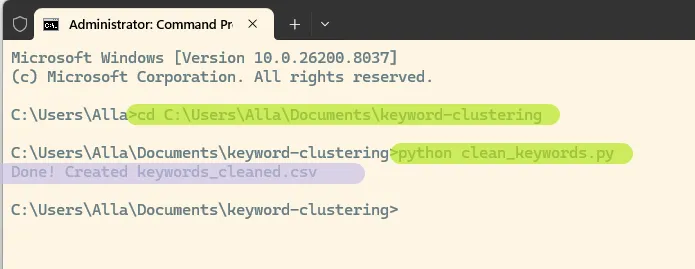
This will create a new file keywords_cleaned.csv with cleaned keywords in your folder.
4. Generate Embeddings
Now we convert keywords into a format that allows us to group them by meaning.
Embeddings are numerical representations of text. Keywords with similar meaning will have similar vectors, which makes clustering possible.
Create embeddings.py
Create a new file: embeddings.py
import pandas as pd
from openai import OpenAI

client = OpenAI(api_key="<strong><mark style="background-color:rgba(0, 0, 0, 0)" class="has-inline-color has-luminous-vivid-amber-color">YOUR_API_KEY</mark></strong>")

# load cleaned dataset
df = pd.read_csv("keywords_cleaned.csv")

keywords = df["keyword_clean"].tolist()

embeddings = []

for kw in keywords:
    response = client.embeddings.create(
        model="text-embedding-3-small",
        input=kw
    )
    embeddings.append(response.data[0].embedding)

# add embeddings to dataframe
df["embedding"] = embeddings

# save result
df.to_csv("keywords_with_embeddings.csv", index=False)

print("Done! Created keywords_with_embeddings.csv")Run the script
python embeddings.py
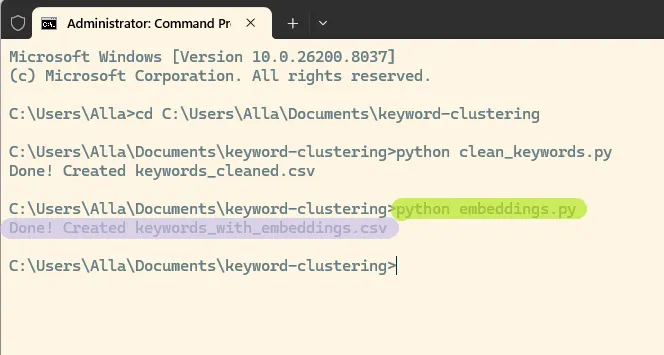
You’ll get a new file keywords_with_embeddings.csv. The script may take some time to run depending on the size of your dataset. In my case, it took about 15 minutes.
Each keyword now has an embedding vector. We will use these vectors in the next step to group keywords into clusters.
5. Cluster Keywords (K-means)
Now that each keyword has an embedding, we can group them into clusters based on meaning.
We’ll use K-means, a simple and effective algorithm that groups similar vectors together.
Create script clustering.py
Create a new file: clustering.py
import pandas as pd
import numpy as np
from sklearn.cluster import KMeans

# load data
df = pd.read_csv("keywords_with_embeddings.csv")

# convert embeddings from text to list
embeddings = df["embedding"].apply(eval).tolist()
X = np.array(embeddings)

# number of clusters
k = 200

# run K-means
kmeans = KMeans(n_clusters=k, random_state=42, n_init=10)
df["cluster"] = kmeans.fit_predict(X)

# save result
df.to_csv("keywords_clustered.csv", index=False)

print("Done! Created keywords_clustered.csv")Run the script
python clustering.pyYou’ll get a new file keywords_clustered.csv, where each keyword is assigned to a cluster.
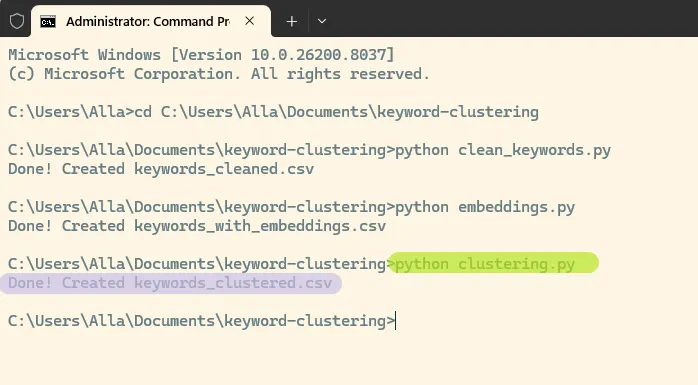
6. Analyze Clusters
At this point, each keyword has a cluster number, but the numbers themselves don’t tell us much. We need to look inside the clusters to understand what they represent.
Check cluster sizes
Create a new file: analyze_clusters.py
import pandas as pd

df = pd.read_csv("keywords_clustered.csv")

cluster_sizes = df.groupby("cluster").size().sort_values(ascending=False)

print(cluster_sizes.head(10))Run it:
python analyze_clusters.pyThis will show the largest clusters in your dataset. In this case, the biggest are 5, 42, 16:
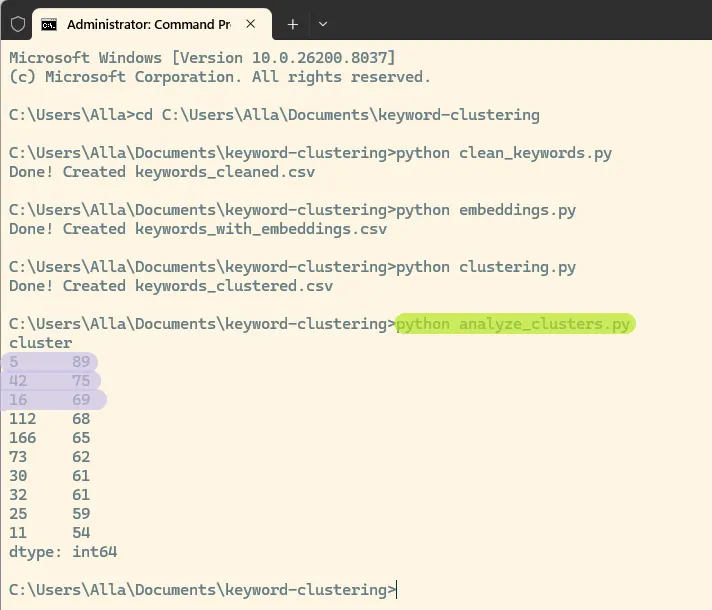
Each number represents a cluster ID, and the value shows how many keywords belong to that cluster.
Inspect a cluster
Create another file: inspect_cluster.py
Add this script:
import pandas as pd

df = pd.read_csv("keywords_clustered.csv")

cluster_id = 5  # <strong><mark style="background-color:rgba(0, 0, 0, 0)" class="has-inline-color has-luminous-vivid-amber-color">change this number</mark></strong>

sample = df[df["cluster"] == cluster_id].sort_values("impressions", ascending=False)

print(sample[["keyword", "impressions"]].head(20))Run it:
python inspect_cluster.pyWhat to look for
- Good clusters have a clear topic
Example: lipstick, matte lipstick, red lipstick - Weak clusters contain mixed or unrelated keywords
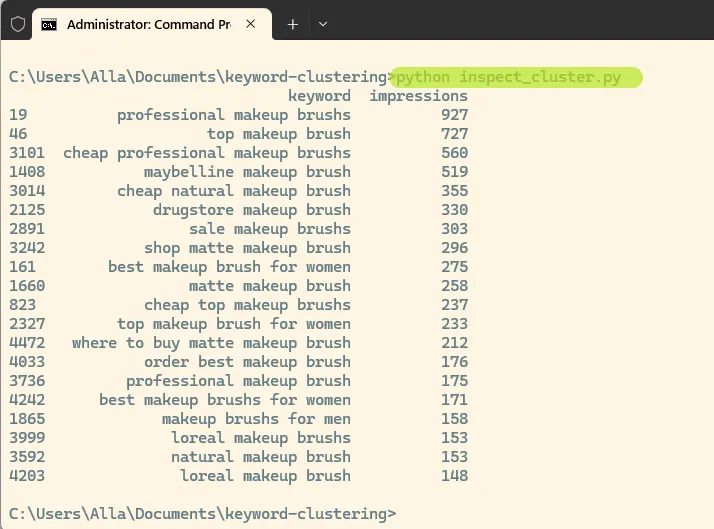
This is a good example of a high-quality cluster. All keywords are centered around the same product: makeup brushes.
Even though the queries include different modifiers such as “best”, “cheap”, “professional”, and brand names, the core meaning remains consistent. This shows that clustering is working as expected and grouping keywords by product rather than intent.
You can repeat this process for other clusters by changing the cluster_id and rerunning the script to review additional groups.
7. Improve Results
At this stage, you will likely see that some clusters are very clean, while others are mixed or too broad. This is normal.
Clustering is an iterative process, and small adjustments can significantly improve the results.
Adjust the Number of Clusters
One of the most important parameters is the number of clusters (k).
- Too few clusters → different products get mixed together
- Too many clusters → very small or fragmented groups
Try increasing or decreasing k in your clustering.py script:
k = 200Rerun the clustering and compare the results.
Iterate and Compare
There is no single perfect setup. The goal is to reach clusters that are:
- consistent in meaning
- useful for SEO
- easy to interpret
Make one change at a time, rerun the scripts, and review the output.
8. Auto-Label Clusters with AI
At this point, each cluster contains a group of related keywords, but we still need to understand what each cluster represents.
Manually naming clusters does not scale well, especially when you have dozens or hundreds of them. Instead, we can use AI to generate labels automatically.
Create script label_clusters.py
Create a new file: label_clusters.py
import pandas as pd
from openai import OpenAI

client = OpenAI(api_key="<strong><mark style="background-color:rgba(0, 0, 0, 0)" class="has-inline-color has-luminous-vivid-amber-color">YOUR_API_KEY</mark></strong>")

df = pd.read_csv("keywords_clustered.csv")

results = []

cluster_ids = df["cluster"].unique()

for cluster_id in cluster_ids:
    group = (
        df[df["cluster"] == cluster_id]
        .sort_values("impressions", ascending=False)
        .head(15)
    )

    keywords = group["keyword_clean"].dropna().tolist()

    if not keywords:
        continue

    prompt = f"""
    Here are keywords from one cluster:
    {keywords}

    1. Give a short cluster name (2-4 words)
    2. Classify as one of:
       - Category (product group)
       - SEO page (modifier or intent)
       - Misc (unclear / mixed)

    Answer EXACTLY in format:
    Name: ...
    Type: ...
    """

    try:
        response = client.chat.completions.create(
            model="gpt-4.1-mini",
            messages=[{"role": "user", "content": prompt}]
        )

        text = response.choices[0].message.content

        name = ""
        type_ = ""

        for line in text.split("\n"):
            line = line.strip()

            if line.lower().startswith("name"):
                name = line.split(":", 1)[-1].strip()

            elif line.lower().startswith("type"):
                type_ = line.split(":", 1)[-1].strip()

        if not name:
            name = text[:60]

        if not type_:
            type_ = "Unknown"

        results.append({
            "cluster": cluster_id,
            "name": name,
            "type": type_
        })

    except Exception as e:
        print(f"Error on cluster {cluster_id}: {e}")
        continue

labels_df = pd.DataFrame(results)
labels_df.to_csv("cluster_labels.csv", index=False)

print("Done! Created cluster_labels.csv")Run the script
python label_clusters.pyYou’ll get a new file cluster_labels.csv with cluster names and types. Here is what the labeled clusters may look like:
| cluster | name | type |
| 150 | Luxury Makeup Brushes | Category |
| 53 | Everyday Natural Primers | SEO page |
| 158 | Setting Spray Types | Category (product group) |
| 100 | Makeup Kits | Category |
Each cluster now has:
- a name that describes the topic
- a type that helps decide how to use it
9. Build Final Dataset
Now we combine everything into one file that is easy to work with by merging keywords with their clusters, along with cluster names and types, into a single dataset.
Create script merge_clusters.py
Create a new file: merge_clusters.py
import pandas as pd

# load clustered keywords
df_keywords = pd.read_csv("keywords_clustered.csv")

# load cluster labels
df_labels = pd.read_csv("cluster_labels.csv")

# merge on cluster column
df_final = df_keywords.merge(df_labels, on="cluster", how="left")

# keep useful columns
df_final = df_final[
    ["keyword", "clicks", "impressions", "cluster", "name", "type"]
]

# sort for convenience
df_final = df_final.sort_values(
    ["cluster", "impressions"], ascending=[True, False]
)

# save result
df_final.to_csv("keywords_final.csv", index=False)

print("Done! Created keywords_final.csv")Run the script
python merge_clusters.pyYou’ll get a new file keywords_final.csv.
Each keyword now has its cluster, cluster name, and cluster type.
| keyword | clicks | impressions | cluster | name | type |
| lipstick for sensitive skin | 25 | 353 | 0 | Lip Products for Sensitive Skin | Category |
| lip glosss for sensitive skin | 45 | 277 | 0 | Lip Products for Sensitive Skin | Category |
| professional lip glosss for sensitive skin | 10 | 255 | 0 | Lip Products for Sensitive Skin | Category |
This is your final dataset and the main output of the clustering process. At the end of this process, you move from a raw list of keywords to a structured dataset grouped by meaning.
AI makes this process much easier. Previously, keyword clustering relied on matching specific words, which made it difficult to group synonyms or variations. With embeddings, keywords are grouped by meaning automatically, so similar queries are clustered together even if they use different wording.
10. Limitations & Real-World Notes
- Clustering is not perfect. Some clusters will be mixed and require manual review.
- Results depend on input quality. Cleaner keywords lead to better clusters.
- There is no single correct number of clusters. You need to experiment.
- AI labeling is helpful but not always accurate and may need adjustments.
- Real datasets are more complex and may include multiple languages, brands, and noise.
- Clustering works best when combined with human judgment.