AI is becoming part of everyday eCommerce merchandising work because merchandising includes a large amount of repetitive operational work.
Merchandising is not only about planning collections, improving UX, or deciding what products deserve visibility on the homepage. A large part of the job is also rewriting supplier descriptions, preparing content for launches, generating category metadata, organizing product information, and fixing content issues across large catalogs.
This is where AI becomes genuinely useful.
The most practical AI workflows are usually simple:
- generating product descriptions from specs and images;
- rewriting supplier copy into cleaner customer-facing content;
- helping brainstorm category structures during catalog planning;
- generating SEO metadata for category pages;
- creating synonym lists for on-site search;
- preparing campaign content faster;
- documenting repetitive workflows and processes.
Most of this work still needs human review. AI helps reduce production time, but merchandising decisions still depend on business context, customer behavior, and brand positioning.
The biggest advantage of AI in merchandising is speed. Getting to a strong first draft in a few minutes is often more valuable than starting every task from scratch.
What AI Can Realistically Automate in Merchandising
One of the easiest ways to get disappointed with AI is by expecting full automation.
Most merchandising work does not disappear with AI. It simply becomes faster.
The biggest improvements usually happen in repetitive operational tasks that already follow some kind of structure or pattern.
For example, AI is very good at repetitive content work:
- rewriting supplier descriptions into a consistent format;
- generating first drafts for PDP content;
- creating short category intros;
- generating SEO metadata for PLPs;
- adapting content for different tones or formats.
AI is also useful when you already have product information but need to organize or expand it faster.
That includes things like:
- generating missing bullet points from existing specs;
- suggesting product attributes from images and descriptions;
- helping brainstorm catalog structures or category groupings;
- generating synonym lists for internal search.
Another surprisingly useful area is workflow documentation.
A lot of merchandising processes exist only inside someone’s brain or inside a Slack message from eight months ago. AI makes it much faster to turn repetitive processes into structured documentation, checklists, or SOPs.
Quality control is another practical use case.
AI is not perfect at QA, but it is very good at spotting patterns and inconsistencies across large amounts of content. It can help identify duplicated descriptions, formatting inconsistencies, missing information, or obvious content gaps much faster than manual reviews alone.
AI Product Description Workflows
Product descriptions are one of the most practical areas for AI in merchandising because most stores already have the raw information somewhere. The challenge is turning that information into content that actually feels useful, readable, and consistent across the catalog.
Supplier descriptions are often too short, too technical, poorly formatted, or written without any real customer context. AI works well as a transformation layer between raw product data and customer-facing PDP content.
A basic workflow usually starts with:
- product specifications;
- supplier descriptions;
- product attributes;
- product images.
From there, AI can generate:
- product descriptions;
- feature highlights;
- bullet points;
- short summaries;
- technical sections;
- HTML-ready PDP content.
The quality of the output depends heavily on the prompt structure. Generic prompts usually create generic descriptions. The better approach is building prompts around real merchandising requirements.
That can include:
- tone-of-voice rules;
- formatting requirements;
- preferred structure;
- banned phrases;
- SEO keywords;
- paragraph length;
- HTML formatting instructions.
One of the most useful AI merchandising workflows I built was for generating eCommerce product content at scale.
I did not want descriptions generated only from raw specifications because that usually creates generic copy that sounds almost identical across products.
Instead, I built a workflow that collects context from multiple sources before generating content.
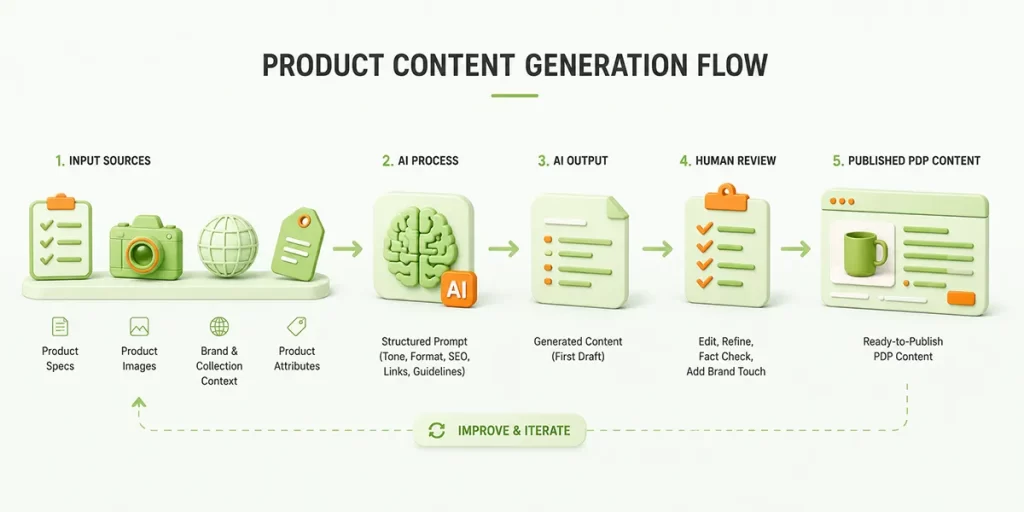
The script scans the product page, extracts specifications and images, then follows links to related brand and collection pages to better understand the overall product style, materials, design direction, and merchandising context.
All of that information gets combined into a structured prompt with:
- tone-of-voice rules;
- formatting requirements;
- SEO structure;
- internal linking logic;
- PDP content guidelines.
The internal linking part was one of the hardest things to structure properly.
I did not want random links inserted simply because products belonged to the same category. I wanted the recommendations to reflect realistic complementary purchases. For example, cups should link to teapots, dessert plates, or serving collections instead of unrelated kitchen products.
That additional context made the content feel much more curated and significantly less generic.
Images also improved the workflow considerably. AI can now identify materials, shapes, colors, finishes, and product types directly from photography, which helps generate stronger first drafts without relying entirely on supplier text.
At the same time, human review still matters.
AI tends to repeat phrases, overuse adjectives, and occasionally invent benefits that were never mentioned anywhere in the product data. It also has a strange tendency to sound extremely emotionally invested in ordinary household objects.
Nobody needs a deeply inspiring story about a storage basket.
The goal is not fully automated copywriting. The real value comes from reducing repetitive production work so merchandising teams can create better PDP content faster and spend more time refining strategy, UX, and product positioning.
AI for Catalog Cleanup and Product Data
Catalog management becomes messy surprisingly fast, especially when products come from different suppliers, brands, or imports.
Even good catalogs slowly accumulate inconsistent formatting, duplicated information, missing specs, and attributes written in five different ways.
AI is useful here because it can process large amounts of product data much faster than manual reviews.
Some of the most practical use cases include:
- standardizing dimensions and specifications;
- normalizing attribute formats;
- rewriting inconsistent supplier text;
- identifying duplicate or near-duplicate content;
- spotting obvious data gaps across catalogs.
This becomes especially useful during large imports or catalog migrations where consistency matters for filtering, search, and PDP quality.
AI is also helpful when preparing structured product data for merchandising workflows. For example, converting inconsistent material names into standardized attributes or organizing specifications into cleaner formats for PDP templates.
AI for SEO and Internal Search
SEO and internal search involve a large amount of repetitive content work, which makes them a good fit for AI workflows.
AI is especially useful for:
- generating metadata for category pages;
- creating category intro content;
- clustering keywords by intent;
- generating synonym lists for on-site search;
- expanding product discoverability.
Instead of writing every title, meta description, or category intro manually, AI can generate structured first drafts much faster.
Internal search is another surprisingly useful area. AI can help generate alternative product terms and customer language variations that improve search matching without manually building massive synonym lists.
AI-Generated Visual Content for Merchandising
AI is also becoming useful for visual merchandising work, especially during early content planning.
I mostly find it helpful for:
- banner ideation;
- lifestyle image prompting;
- campaign moodboards;
- blog visuals;
- early creative direction.
The biggest improvement happens when the workflow is built around consistency instead of generating random visuals every time.
For example, for this blog I built a custom GPT with predefined style guides, composition rules, colors, and thumbnail structure. Because of that, I can write something as simple as “create an image of screwdriver” and the output already follows the correct format and visual style for the blog.
That is where AI starts becoming genuinely practical.
Instead of manually explaining the same visual rules repeatedly, the system already understands:
- composition;
- style;
- color palette;
- object selection;
- spacing;
- overall brand direction.
This is especially important in eCommerce because visual consistency matters more than generating impressive standalone images.
Any AI workflow for visuals should follow the core rules of the brand or store:
- how products are presented;
- what backgrounds are allowed;
- how lighting should look;
- what materials should feel like;
- how promotional visuals are structured;
- what visual style customers already associate with the brand.
Without those rules, AI usually creates inconsistent content very quickly.
AI-generated visuals still work best for conceptual content, blog graphics, or supporting campaign assets. They work much worse for highly accurate product photography where proportions, textures, materials, and colors must match the real product exactly.
AI Workflows That Saved Me the Most Time
1. Automated PDP Content Generation
The biggest time saver was building workflows for automated PDP content generation.
I created workflows that collect information from product pages, specifications, images, brand pages, and collections, then combine all of that context into structured prompts for generating product descriptions, feature sections, and internal links.
The additional context made the content feel much more curated and significantly less generic.
2. AI-Assisted Image Prompting
AI-assisted image prompting became much more useful once I standardized the visual rules.
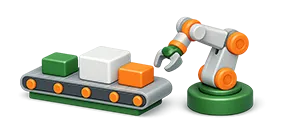
For this blog, I built a custom GPT with predefined style guides, colors, composition rules, and thumbnail structure. Because of that, I can write something simple like “create image of conveyor + robotic arm” and the output already follows the correct visual format.
That consistency reduced a huge amount of repetitive prompt writing.
3. Content QA Checks
AI also became useful for content quality control.
It is very good at scanning large amounts of content for duplicated phrasing, formatting inconsistencies, missing sections, or obvious content gaps.
Reviewing AI-checked content is much faster than manually reviewing everything from scratch.
4. Workflow Documentation
Documenting repetitive workflows became significantly easier with AI.
A lot of eCommerce operational processes exist only as habits or scattered internal notes. AI helped turn those processes into structured SOPs, checklists, and reusable documentation much faster.
5. Hero Banner and Rich Content Copy Ideas
AI also became useful for generating content ideas for hero banners, collection pages, and rich content sections.
Instead of starting from a blank page every time, I could generate multiple headline directions, promotional angles, feature callouts, and content structures much faster.
The important part was building the workflow around brand guidelines and merchandising rules instead of asking AI for completely random creative ideas.
That included things like:
- preferred tone of voice;
- headline structure;
- prohibited phrases;
- CTA style;
- luxury vs casual positioning;
- content hierarchy;
- how products should be described visually.
Once those rules were built into the workflow, the output became significantly more usable and consistent.
The Real Future of AI in Merchandising
Most merchandising teams are not trying to fully automate creativity or replace humans. They are trying to execute faster, manage larger catalogs more efficiently, and reduce repetitive operational work.
That is where AI already creates real value. The biggest shift is that smaller teams can now handle workloads that previously required significantly more manual production work. Product launches, PDP creation, campaign preparation, SEO support, and visual content generation all move faster when AI workflows are built properly.
The important part is that the workflows need structure. AI becomes significantly more useful when it operates inside clear systems:
- brand guidelines;
- visual rules;
- prompt libraries;
- merchandising logic;
- formatting standards;
- SEO structures;
- operational processes.
Without those systems, AI usually creates inconsistency faster than humans can review it. I also think merchandising people who understand systems will become much more valuable. Not just people who can write prompts, but people who understand:
- customer behavior;
- catalog structure;
- product positioning;
- internal search;
- CRO;
- UX;
- merchandising strategy.
Because AI still does not understand why customers emotionally connect with certain products, why some categories convert better than others, or why a homepage sometimes feels “off” even when all the data technically looks correct.
Those decisions still depend heavily on human judgment.